
Use this checklist to make sure your email came from
PayPal:
Check the greeting:
We always address you by your first and last name, or by
the business
name on your PayPal account.
Check the link before you click:
Before you click a link in an email, hover your cursor over
the link and
check the web address. If the web address doesn't start
with
"https://www.paypal.com," don't click the link.( Try it here)
Check for requests for your personal information:
We?ll never use a PayPal email to ask you for any of the
following:
* Your bank account numbers
* Your debit and credit card numbers
* Your driver's license number
* Your email addresses
* Your full name
Check for a shipping number request:
Be on alert for emails that ask you to provide the shipping
number
before the buyer pays you.
Check for attachments or software updates:
We?ll never send an email with an attachment, or ask you to
install
software updates on your computer.
If anything on this checklist matches your email, someone
may be trying
to "spoof" or "phish" your account. Spoofing and phishing
are illegal
attempts to steal your identity, passwords, or other
personal or
financial information. If you?ve already clicked on a link
in the email
and entered personal information, you should change your
PayPal account
password and security questions immediately.
Just to be on the safe side, you should also review your
most recent
payment history for anything unusual or unauthorized. If
anything on
your account looks out of the ordinary, please let us know
about it as
soon as you can.
Here?s how you can report an unauthorized transaction:
1. Log into your PayPal account.
2. Select "Resolution Center.?
3. Click "Open a dispute."
4. Select "Unauthorized transaction," and then click
"Continue."
5. Enter or select the transaction ID for the transaction
you want to
dispute, and then click "Continue."
6. Complete the report for Unauthorized Use on a PayPal
Account, and
then click "Continue."
7. Confirm that the claim is correct, and then click
"Submit."
To learn more about protecting your account, click
"Security Center" on
any PayPal webpage.
PayPAls office
Registered Office:
5th Floor 22-24 Boulevard Royal L-2449, Luxembourg RCS
Luxembourg B 118
349.
Showing posts with label trojans. Show all posts
Showing posts with label trojans. Show all posts
Monday, July 19, 2010


Monday, May 17, 2010
Online Banking Are You safe ?
When you access your bank account online you probably don't think that at that exact moment there may be a hacker, somewhere in the world, trying to steal your bank information and your money.
• Beware the Risks of Joint Bank Accounts
• A Cheat Sheet on Tipping Do's and Don'ts
• Learn Grocery Pricing Secrets and Save
Your bank offers secure online banking, so why should you worry, right?
Despite banks' efforts to protect accounts from the online crooks, hacker attacks remain a serious threat that cost Americans millions of dollars each year. The Internet Crime Complaint Center reported that Americans lost about $559 million to Internet thieves in 2009. That is more than twice the 2008 figure, when $268 million was stolen on the Internet, according to the center.
"Last year there were more online bank robberies than there were actual on-site bank robberies," says Sean Sullivan, a security adviser at F-Secure, an Internet security firm. "Banks have become very proactive in protecting accounts from hackers, but it's still quite a large problem. We see all types of new attempts every day."
--------------------------------------------------------------------------------
Biggest Threat
Banking Trojans -- malicious code specifically designed for banking fraud -- are one of the biggest threats to consumers who bank online, Sullivan says. They are invisible and can steal multiple types of data, including passwords. Some more advanced types of Trojans can make fraudulent transfers and drain your account while you are logged on to the account online, he says.
Is Your Bank Safe?
The more questions and passwords you are asked to enter in order to log in to your account, the safer is your bank's website.
If your bank only asks you to enter a username and password to log in its website is not as secure as it should be, Sullivan says.
Some banks require customers to create a username, a site key name and use personalized pictures or symbols that appear during the login process. In addition, banks should ask customers to answer a security question before gaining access to their account.
"The more layers you have before you get to your account, the safer you are," Sullivan says.
Who's Liable?
In the event you become a victim of online theft, act quickly and know your rights. The general rule for consumer checking and savings accounts is the bank is liable for most of the damage, as long as you report the illicit transfer in a timely manner. But if you have a line of credit account or a business account, you need to be extra careful, because the bank will not always be obligated to pay for your loss.
"It is based on whether the customer's conduct with respect to security was reasonable," he says. In that case the court will ultimately determine who was more at fault for the breach -- the bank or the consumer.
Business Accounts
Business accounts are the most vulnerable to hacker attacks and the least protected by the law. Hackers are much more inclined to break into a six-figure business account than a consumer account with a few thousand dollars, Sullivan says.
"There are hundreds of cases of thefts of money from small business deposit accounts each year," Johnson says.
Business accounts are regulated by the Uniform Commercial Code, or UCC, which requires banks to maintain "commercial reasonable authentication security procedures," in any kind of wire transfer, he says.
"If the bank can show the breach was caused by something the customer did the bank is not liable," Johnson says.
California attorney Nada Alnajafi says most small businesses don't understand the risk they are taking when they use wire-transfer accounts.
"I don't think a lot of them understand they are taking almost full risk for any potential issues," she says.
She is representing a small Los Angeles business owner who lost $50,000 after a hacker committed a fraudulent transfer from his Bank of America account to a Croatian Bank. She filed a lawsuit on behalf of her client against Bank of America in February because the bank refused to take responsibility for the theft, she says.
Bank of America claims it is not liable for the illicit transfer. The lawsuit is pending.
How to Help Protect Your Account
• Don't access your account from a shared computer.
• Be certain your computer has anti-virus, firewall and anti-spyware programs, including security software with automatic updates.
• If you are using wireless service, check the settings on your computer to make sure the connection is encrypted. Don't connect to your account using a public network, like the ones you find at a coffee shop or at the airport.
• Review your statements regularly and carefully, and report any suspicious activity to your bank immediately.
• Use a strong password with letters and numbers combined. Don't use the same password for multiple accounts.
• Log out after every session.
• Beware the Risks of Joint Bank Accounts
• A Cheat Sheet on Tipping Do's and Don'ts
• Learn Grocery Pricing Secrets and Save
Your bank offers secure online banking, so why should you worry, right?
Despite banks' efforts to protect accounts from the online crooks, hacker attacks remain a serious threat that cost Americans millions of dollars each year. The Internet Crime Complaint Center reported that Americans lost about $559 million to Internet thieves in 2009. That is more than twice the 2008 figure, when $268 million was stolen on the Internet, according to the center.
"Last year there were more online bank robberies than there were actual on-site bank robberies," says Sean Sullivan, a security adviser at F-Secure, an Internet security firm. "Banks have become very proactive in protecting accounts from hackers, but it's still quite a large problem. We see all types of new attempts every day."
--------------------------------------------------------------------------------
Biggest Threat
Banking Trojans -- malicious code specifically designed for banking fraud -- are one of the biggest threats to consumers who bank online, Sullivan says. They are invisible and can steal multiple types of data, including passwords. Some more advanced types of Trojans can make fraudulent transfers and drain your account while you are logged on to the account online, he says.
Is Your Bank Safe?
The more questions and passwords you are asked to enter in order to log in to your account, the safer is your bank's website.
If your bank only asks you to enter a username and password to log in its website is not as secure as it should be, Sullivan says.
Some banks require customers to create a username, a site key name and use personalized pictures or symbols that appear during the login process. In addition, banks should ask customers to answer a security question before gaining access to their account.
"The more layers you have before you get to your account, the safer you are," Sullivan says.
Who's Liable?
In the event you become a victim of online theft, act quickly and know your rights. The general rule for consumer checking and savings accounts is the bank is liable for most of the damage, as long as you report the illicit transfer in a timely manner. But if you have a line of credit account or a business account, you need to be extra careful, because the bank will not always be obligated to pay for your loss.
"It is based on whether the customer's conduct with respect to security was reasonable," he says. In that case the court will ultimately determine who was more at fault for the breach -- the bank or the consumer.
Business Accounts
Business accounts are the most vulnerable to hacker attacks and the least protected by the law. Hackers are much more inclined to break into a six-figure business account than a consumer account with a few thousand dollars, Sullivan says.
"There are hundreds of cases of thefts of money from small business deposit accounts each year," Johnson says.
Business accounts are regulated by the Uniform Commercial Code, or UCC, which requires banks to maintain "commercial reasonable authentication security procedures," in any kind of wire transfer, he says.
"If the bank can show the breach was caused by something the customer did the bank is not liable," Johnson says.
California attorney Nada Alnajafi says most small businesses don't understand the risk they are taking when they use wire-transfer accounts.
"I don't think a lot of them understand they are taking almost full risk for any potential issues," she says.
She is representing a small Los Angeles business owner who lost $50,000 after a hacker committed a fraudulent transfer from his Bank of America account to a Croatian Bank. She filed a lawsuit on behalf of her client against Bank of America in February because the bank refused to take responsibility for the theft, she says.
Bank of America claims it is not liable for the illicit transfer. The lawsuit is pending.
How to Help Protect Your Account
• Don't access your account from a shared computer.
• Be certain your computer has anti-virus, firewall and anti-spyware programs, including security software with automatic updates.
• If you are using wireless service, check the settings on your computer to make sure the connection is encrypted. Don't connect to your account using a public network, like the ones you find at a coffee shop or at the airport.
• Review your statements regularly and carefully, and report any suspicious activity to your bank immediately.
• Use a strong password with letters and numbers combined. Don't use the same password for multiple accounts.
• Log out after every session.
Friday, April 23, 2010
Do you or have had one of These ?
These are some of the most common Fake Virus programs out. You can click on the picture or Icon to see a bigger view of the Fake Virus.
Antivirus 7

CleanUp Antivirus

Security Central

Antivirus security

Total PC Defender 2010

Vista Antivirus Pro 2010

Your PC Protector
Vista Internet Security 2010
XP Guardian
Vista Guardian 2010
Antivirus Soft
XP Internet Security 2010
Antivirus 2010
Live PC Care
Malware Defense
Internet Security 2010
Desktop Defender 2010
Security Tool

Antivirus Live
Personal Security
Cyber Security
Alpha Antivirus
Windows Enterprise Suite
Security Center
Control Center
Braviax
Windows Police Pro
Antivirus Pro 2010
PC Antispyware 2010
FraudTool.MalwareProtector.d
Winshield2009.com
Green AV
Windows Protection Suite
Total Security 2009
Windows System Suite
Antivirus BEST
System Security
Personal Antivirus
System Security 2009
Malware Doctor
Antivirus System Pro
WinPC Defender
Anti-Virus-1
Spyware Guard 2008
System Guard 2009
Antivirus 2009
Antivirus 2010
Antivirus Pro 2009
Antivirus 360
MS Antispyware 2009
IGuardPC or I Guard PC
Additional Guard
(all of them are fake antivirus which are
viruses or trojans) from your computer.
Remove Fake Antivirus is used to remove
fake antivirus which are viruses or trojans.
Also you can use Malwarebytes here is a Picture of the real Program
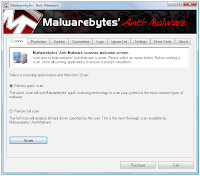
Just depends on what you like
Antivirus 7

CleanUp Antivirus

Security Central

Antivirus security

Total PC Defender 2010

Vista Antivirus Pro 2010

Your PC Protector
Vista Internet Security 2010
XP Guardian
Vista Guardian 2010
Antivirus Soft
XP Internet Security 2010
Antivirus 2010
Live PC Care
Malware Defense
Internet Security 2010
Desktop Defender 2010
Security Tool

Antivirus Live
Personal Security
Cyber Security
Alpha Antivirus
Windows Enterprise Suite
Security Center
Control Center
Braviax
Windows Police Pro
Antivirus Pro 2010
PC Antispyware 2010
FraudTool.MalwareProtector.d
Winshield2009.com
Green AV
Windows Protection Suite
Total Security 2009
Windows System Suite
Antivirus BEST
System Security
Personal Antivirus
System Security 2009
Malware Doctor
Antivirus System Pro
WinPC Defender
Anti-Virus-1
Spyware Guard 2008
System Guard 2009
Antivirus 2009
Antivirus 2010
Antivirus Pro 2009
Antivirus 360
MS Antispyware 2009
IGuardPC or I Guard PC
Additional Guard
(all of them are fake antivirus which are
viruses or trojans) from your computer.
Remove Fake Antivirus is used to remove
fake antivirus which are viruses or trojans.
Also you can use Malwarebytes here is a Picture of the real Program
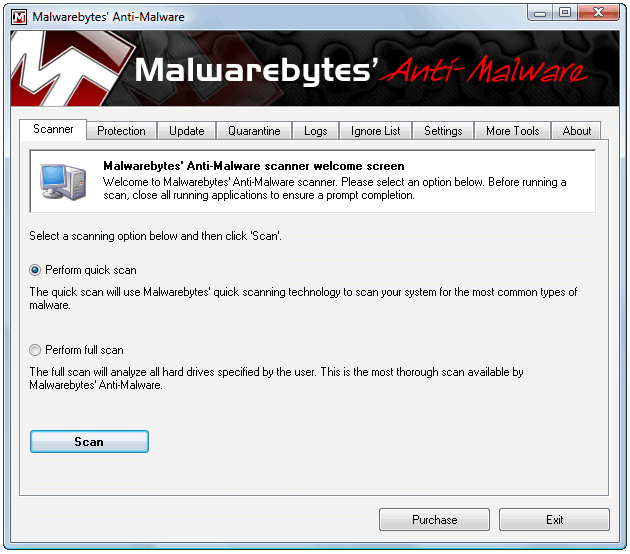
Just depends on what you like
Sunday, April 18, 2010
"How do I change my IP address?"
"How do I change my IP address?" and "Can I change my IP address?" are probably the most commonly asked questions. Please attempt the following then, if that does not work, visit the Change IP Address forum.
Before trying any other methods to change your IP address, try turning off (or unplugging the power of) your Cable/DSL modem for five minutes. In many cases this will change your IP address. However, if that does not change your IP address, repeat the process for 8 hours (overnight works well) instead of 5 minutes. Hopefully this will result in an IP change.
If the above does not result in your IP address changing, please look through the below for the situation that best matches yours and attempt to change your IP address that way. Unfortunately you are not able to get your IP address to change in all cases, as it is ultimate determined by your ISP's DHCP configuration (when you've got a dynamically assigned IP address, that is.)
Windows - Computer connected directly to the modem
Get to a command prompt. (START, run, cmd).

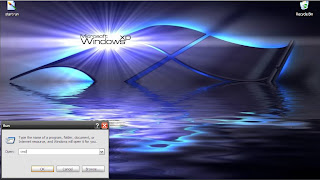
Type "ipconfig /release" (without the quotes, on the command line by itself).
Type "ipconfig /renew" (without the quotes, on the command line by itself).

Windows (second option) - Computer connected directly to the modem
Get to a command prompt. (START, run, cmd).
Type "ipconfig /release" (without the quotes).
Shut down computer.
Turn off computer.
Turn off all ethernet hubs/switches.
Turn off cable/DSL modem.
Leave off overnight.
Turn everything back on.
Network with Router
Log into the router's admin console. (Often http://192.168.1.1/)
Release the IP address. (Method varies by router manufacturer)
Turn off router, ethernet hubs/switches, and the cable/DSL modem.
Leave off overnight.
Turn everything back on.
If you are using a cable/DSL modem and a router, you may wish to connect your computer directly to the cable/DSL modem. Please note that this could significantly impact your system security. This allows your ISP's DHCP to issue you a new (hopefully changed) IP address based of the (hardware) MAC address of your computer's ethernet card.
If all the above has not worked to change your IP address and you have a router, check and see if there is a "Clone MAC Address" option. Using it should change your IP address; however, you'll only be able to do it once (in most cases).
These will not work in all cases. If all else fails contact your internet service provider (ISP) and ask them if they are able to change your IP address or how long your connection needs to be off for your IP address to change.
Click HERE to check your internet Speed From Cnet Reviews.
Also known as Downloads.com
Before trying any other methods to change your IP address, try turning off (or unplugging the power of) your Cable/DSL modem for five minutes. In many cases this will change your IP address. However, if that does not change your IP address, repeat the process for 8 hours (overnight works well) instead of 5 minutes. Hopefully this will result in an IP change.
If the above does not result in your IP address changing, please look through the below for the situation that best matches yours and attempt to change your IP address that way. Unfortunately you are not able to get your IP address to change in all cases, as it is ultimate determined by your ISP's DHCP configuration (when you've got a dynamically assigned IP address, that is.)
Windows - Computer connected directly to the modem
Get to a command prompt. (START, run, cmd).

Start then Click Run

Once you click on Run this window opens and you type in CMD. it means command.
Type "ipconfig /release" (without the quotes, on the command line by itself).
Type "ipconfig /renew" (without the quotes, on the command line by itself).

Once Iprelease is typed into the Command line it should kick you off line for a moment. Then type in IPRENEW and you should reconnect.
Get to a command prompt. (START, run, cmd).
Type "ipconfig /release" (without the quotes).
Shut down computer.
Turn off computer.
Turn off all ethernet hubs/switches.
Turn off cable/DSL modem.
Leave off overnight.
Turn everything back on.
Network with Router
Log into the router's admin console. (Often http://192.168.1.1/)
Release the IP address. (Method varies by router manufacturer)
Turn off router, ethernet hubs/switches, and the cable/DSL modem.
Leave off overnight.
Turn everything back on.
If you are using a cable/DSL modem and a router, you may wish to connect your computer directly to the cable/DSL modem. Please note that this could significantly impact your system security. This allows your ISP's DHCP to issue you a new (hopefully changed) IP address based of the (hardware) MAC address of your computer's ethernet card.
If all the above has not worked to change your IP address and you have a router, check and see if there is a "Clone MAC Address" option. Using it should change your IP address; however, you'll only be able to do it once (in most cases).
These will not work in all cases. If all else fails contact your internet service provider (ISP) and ask them if they are able to change your IP address or how long your connection needs to be off for your IP address to change.
Click HERE to check your internet Speed From Cnet Reviews.
Also known as Downloads.com
Wednesday, March 31, 2010
Malwarebytes
http://www.youtube.com/watch?v=VpyoY7MT8xY
Free to use,
And works on all windows ver.
Check it out if you think you have a virus or a trojan.
And if you do not think you have one, Try it anyways just to make sure.
Description of Malware
AdwareAdware (or spyware) is a small program that is designed to show advertisements (in various form and degrees of intrusiveness) on your computer. It often reports personal information back to its owners. As a result your sense of privacy can be violated.
BackdoorA backdoor is a small malicious program that is used to gain access to a computer by bypassing the computer access security mechanisms. It gives the attacker almost unlimited rights. While it can be used to spy on a user, it is mainly used to install other malware on the system.
HeuristicA technique designed to detect malware by empirical means but without having the specific data.
MalwareA generic name for all types of malicious programs: adware, backdoors, rogues, trojans, viruses and worms.
RogueA rogue program is a malicious program that is disguised, for instance, as trustworthy anti-spyware programs or registry cleaners. But these programs are only put on the market to scare you into buying these programs because they make exaggerated claims about the safety of your computer or, worse still, give erroneous scan results or put their own malware in your system.
TrojanA trojan (or Trojan horse) is a small malicious program that pretends to have a particular function, but that only shows its real purpose after execution and that purpose is often destructive. Trojans cannot multiply themselves, which differentiates them from viruses and worms.
VirusA virus is a small malicious program that multiplies and is capable to attach itself to other programs after being executed. It then causes an infection and causes various degrees of damage to your computer.
WormA worm is often characterized as a malicious application that will use a host machine to infect other machines. Therefore worms can create enormous damage on networks with multiple computers.

Free to use,
And works on all windows ver.
Check it out if you think you have a virus or a trojan.
And if you do not think you have one, Try it anyways just to make sure.
Description of Malware
AdwareAdware (or spyware) is a small program that is designed to show advertisements (in various form and degrees of intrusiveness) on your computer. It often reports personal information back to its owners. As a result your sense of privacy can be violated.
BackdoorA backdoor is a small malicious program that is used to gain access to a computer by bypassing the computer access security mechanisms. It gives the attacker almost unlimited rights. While it can be used to spy on a user, it is mainly used to install other malware on the system.
HeuristicA technique designed to detect malware by empirical means but without having the specific data.
MalwareA generic name for all types of malicious programs: adware, backdoors, rogues, trojans, viruses and worms.
RogueA rogue program is a malicious program that is disguised, for instance, as trustworthy anti-spyware programs or registry cleaners. But these programs are only put on the market to scare you into buying these programs because they make exaggerated claims about the safety of your computer or, worse still, give erroneous scan results or put their own malware in your system.
TrojanA trojan (or Trojan horse) is a small malicious program that pretends to have a particular function, but that only shows its real purpose after execution and that purpose is often destructive. Trojans cannot multiply themselves, which differentiates them from viruses and worms.
VirusA virus is a small malicious program that multiplies and is capable to attach itself to other programs after being executed. It then causes an infection and causes various degrees of damage to your computer.
WormA worm is often characterized as a malicious application that will use a host machine to infect other machines. Therefore worms can create enormous damage on networks with multiple computers.
Friday, March 26, 2010
Spyware

Have Used Alot of Atni-Virus Programs Myself.
I have recommended a few out.
And StopZilla is one I do would recommend.
I have seen this one Stop a virus that some of the others will not.
Anti-Virus programs To me are more of how user friendly they are. Just like any operating system Some people Like XP or Vista and even Windows 7
StopZilla is compatiable with all mentioned windows above.
Just simply Click on the Above picture and See how it works on your system

Thursday, March 25, 2010
Family Norton, FREE
Click Here
This Free program from norton Gives you the ability to see what Web sites your kids goto who they talk too. An you can even Block a website an never even get on their computer.
This Free program from norton Gives you the ability to see what Web sites your kids goto who they talk too. An you can even Block a website an never even get on their computer.
Subscribe to:
Posts (Atom)


