Search This Blog

GeoString

Friday, April 23, 2010

Play Your Media on Any Device

There are so many different file formats available, and each song or video always seems to be in a format that's not playable unless you jump through hoops and install new software and codecs each time. With a file conversion program, you can take a media file and make it playable on almost any device. That comes in very handy when you want to email videos or songs you've made to your friends, but they don't have the program that can play the format you saved it in.


With Convert Genius, you can just change it into a format everyone has, like Quicktime, and never have to worry about your friends not being able to see the wonderful two hours of family movies you just sent them. For me, that means I can take my Flip Video movies and play them back on my iPhone.


Convert Genius is an easy-to-use media conversion tool that allows us to handle a variety of media files, providing good quality results. The application stands out mainly for the wide number of formats supported. It is possible to convert among popular audio files like MP3, WAV, WMA, OGG and other formats, and also among the most widely used video file types, such as DiVX, WMV, MP4, MOV, 3GP and more. For each output format we can specify the video/audio encoder, audio and video bit rate, aspect ratio, and other advanced settings.


The application's interface has a quite sophisticated look, and is very intuitive; you simply have to select the files you want to convert, choose the output format, and click a button to start the conversion. This process, depending on the size of the media file, is relatively fast, I can even say that it's faster than with other applications of the kind, and the results are of high quality. Besides, it is possible to convert a number of media files simultaneously with the batch conversion option. From the program's settings, you can also set other advanced features like adjusting thread options and log level.

Click HERE to get yours


msiexec.exe. What is it?

msiexec.exe. What is it?


diggMsiexec.exe is Windows® Installer.

This file is part of Windows Installer - Unicode. Msiexec.exe is developed by Microsoft Corporation. It is used to install new programs that use Windows Installer package files (MSI). It should only be running if you are running an installer. Msiexec is important for computer security and stability and should not be terminated. It’s a system and hidden file.


Msiexec.exe is usually located in the %PROGRAM_FILES% sub-folder and its usual size is 77,824 bytes.

If you are not installing anything, but msiexec is running, chances are it's a virus. Scan your computer with Malwarebytes  to make sure it's not infected.


The msiexec.exe process may also be running all the time if the Windows Installer service is set to Automatic by mistake. You'll need to change the service startup type to manual. We recommend doing that using

You can also do it manually. Here's how:


1. Go to Start - Run, type in services.msc and hit Enter. A new window will open.


2. Find the Windows Installer service, right-click on it and click on Properties. A new window will open.


3. In the Startup type section, use the dropdown menu to select Manual.


4. Click Apply, then click OK


Windows XP Users: If you a getting an error saying "The Windows Installer Service Could Not Be Accessed", read this Microsoft article.


The Windows Installer Service Could Not Be Accessed"


Recommendation
Malwarebytes.org ( For Torjans, Viruses And some fake anti-virus programs)
Ccleaner.com ( does about the same as malwarebytes)

Here is a few other programs of interest Click HERE

This one is also in on of my other blogs I think, But you can get it here as well I have tested this Program and it does work. I tested it out on XP on my laptop. Since i did not have any fake viruses it didnt do nothing, So try it out if you think you have a fake Virus program It works Click HERE


--------------------------------------------------------------------------------


Do not terminate msiexec.exe if you are running an installer.

To go directly to the Online Chat room you can click HERE Enter your name and your in.
 
 
Also at the bottom of this BLOG you can leave a message or a question.

Do you or have had one of These ?

These are some of the most common Fake Virus programs out. You can click on the picture or Icon to see a bigger view of the Fake Virus.

Antivirus 7


CleanUp Antivirus


Security Central


Antivirus security


Total PC Defender 2010


Vista Antivirus Pro 2010


Your PC Protector


Vista Internet Security 2010


XP Guardian


Vista Guardian 2010


Antivirus Soft


XP Internet Security 2010


Antivirus 2010


Live PC Care

Malware Defense


Internet Security 2010


Desktop Defender 2010

Security Tool


Antivirus Live


Personal Security


Cyber Security


Alpha Antivirus


Windows Enterprise Suite


Security Center


Control Center

Braviax


Windows Police Pro


Antivirus Pro 2010


PC Antispyware 2010


FraudTool.MalwareProtector.d


Winshield2009.com


Green AV


Windows Protection Suite


Total Security 2009


Windows System Suite


Antivirus BEST


System Security


Personal Antivirus


System Security 2009


Malware Doctor


Antivirus System Pro


WinPC Defender


Anti-Virus-1

Spyware Guard 2008

System Guard 2009

Antivirus 2009

Antivirus 2010

Antivirus Pro 2009

Antivirus 360

MS Antispyware 2009


IGuardPC or I Guard PC


Additional Guard

(all of them are fake antivirus which are


viruses or trojans) from your computer.


Remove Fake Antivirus is used to remove


fake antivirus which are viruses or trojans.


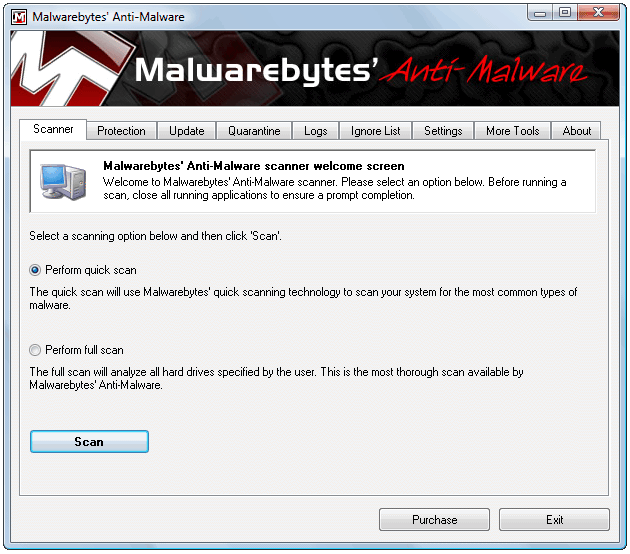
Also you can use Malwarebytes  here is a Picture of the real Program


Just depends on what you like