
Lead generation scams
Through 2009 Zynga made money from lead generation advertising schemes, whereby game participants would earn game points by signing up for featured credit cards or video-rental services. These were criticized as being less cost-effective than simply buying game points, and in some cases, being outright scams that would download unwanted software or unwittingly sign up for a recurring subscription.[11] On October 31, 2009, Michael Arrington of TechCrunch said that Zynga intentionally worked with scam advertisers, and that lead generation made up a third of Zynga's revenue.[18] Arrington also alleged that Facebook was complicit in this.[19] On November 2, 2009, CEO Mark Pincus announced a reform in its offers: Tatto Media, a major offer provider that enrolled users into recurring cell phone subscriptions, would be banned, all mobile offers would be removed, and offer providers would be required to pre-screen offers.[20]
Arrington continued to question Pincus' role in the scams, republishing a video of a speech by Pincus.[21] In the speech, Pincus said:
So I funded [Zynga] myself but I did every horrible thing in the book to, just to get revenues right away. I mean we gave our users poker chips if they downloaded this Zwinky toolbar which was like, I don't know, I downloaded it once and couldn’t get rid of it. *laughs* We did anything possible just to just get revenues so that we could grow and be a real business.
—Mark Pincus, Speech from Startup@Berkeley
In response, Pincus noted that after offering the Zwinky toolbar, his team of ten decided to remove it since it was a "painful experience."[22]
Several days after the Techcrunch story, Zynga's most recent Facebook game FishVille, was temporarily taken offline by Facebook on claim of advertising violations. According to Zynga, Fishville had 875,000 users within two days of launch. A release from Facebook on its reasons for taking the game offline read that "FishVille will remain suspended until Facebook is satisfied that Zynga demonstrates compliance with Facebook restrictions — as well as Zynga’s own restrictions — on the ads it offers users."[23] FishVille was later un-suspended at midnight November 9/10.[24]
Several suits were filed against Zynga for promoting such offers,[25][26] including a class-action lawsuit in the United States District Court for the Northern District of California for violation of the Unfair competition law and the Consumers Legal Remedies Act, after the lead plaintiff's credit card was billed more than $200 for offers she completed to receive YoVille currency.[27][28][29]
Pincus later said that he had been too eager to increase company revenues through advertising, and that operating in reactive mode by taking down ads only after receiving complaints had not worked. The company removed all ads for a time, relying only on direct purchase of game currency, then began reintroducing third party ads only after they had been screened.[11]
Other criticism
In September 2009 Zynga was threatened with legal action by Nissan for alleged use of their trademarks in the game Street Racing. Zynga subsequently renamed and changed the thumbnail images of all cars that were branded Nissan and Infiniti to "Sindats" and "Fujis" with the thumbnails changed.[30] At the time they also renamed and redesigned automobiles depicted as being made by GM, Ferrari, Lamborghini, Saab, and others.
Another source of criticism is non-players who grow tired of seeing updates about their friends' social gaming activity. Facebook groups created to express displeasure regarding overexposure of Zynga's games attracted millions of members.[11]
After all of the Scams and ways for Not only Zynga to make Big money Facebook it's self is to blame as well.
I'm a FaceBook user, And in the past recent months I have seen alot of changes that I think have made some Difference in the way they work and operate, Now They are the #2 ranked website (Google #1), But at what cost ?
Well at first they had a bad reputation for scams on the social network, And now that the Site is making Millions they can be picky on how the games are run on the website, Or you would think. I admit it is alot better and the Privacy settings are better, you just got to know how to use them.
Under Account at the top right on Facebook Click on Account setting, Change your Privacy settings
Also look under the Application settings, Check all of the Applications on your Facebook account.
If you Did'nt add it then I would remove it.
Any questions you can Email Us : customerservice@md4urpc.com
Tuesday, May 11, 2010


Start here to set up a network in Windows 7
There are six steps in the process of setting up a home or small office network. Each step is listed below along with links to detailed information about that step. For an overview of the process, see Setting up a wireless network.
1. Plan your network
Decide what type of network you want. We recommend using a wireless network so that you have the option of using wired or wireless connections. Wireless connections give you the most mobility since they use radio waves to send information between computers. For more information, see What you need to set up a home network.

2. Get the necessary hardware and an (optional) ISP
At a minimum, you'll need a router
and a network adapter for each computer (most laptops come with a wireless network adapter already installed). If you want to connect to the Internet, you'll need to have an account set up with an Internet service provider (ISP). For more information, see Selecting a wireless router or another wireless network device.
3. Set up the router
If your router displays the Windows 7 logo or the phrase "Compatible with Windows 7," you can set it up automatically using the latest version of Windows Connect Now (WCN) on Windows 7 or Windows Vista Service Pack 2. Otherwise, most routers come with a setup CD that will assist you in setting it up. Follow the instructions that came with your router. For more information, see Set up a wireless router.
4. Connect the router to the Internet (optional)
You don't have to do this step, but we highly recommend it. Most people find it very valuable to have an Internet connection. To connect the router to the Internet, follow the instructions provided by your ISP, or see Set up a broadband (DSL or cable) connection.
5. Connect computers and devices to the network
For the easiest setup, buy devices that display the Windows 7 logo or the phrase "Compatible with Windows 7," and then follow the instructions that came with the device. For more information, see Set up a wireless router, and refer to the section entitled "Connect other computers to the network." Also, search Help and Support for "Add a device or computer to a network."
6. Create a homegroup or turn on file and printer sharing
If you're setting up a home network, creating a homegroup is the easiest way to share files and printers. All homegroup computers must be running Windows 7. For more information, search Help and Support for "Create a homegroup." Also, see Join a homegroup and What is a homegroup?
If you have different versions of Windows on your network computers or you're setting up a small office network, you'll need to turn on file and printer sharing. For more information, see Networking home computers running different versions of Windows.

How do I access the router’s web-based setup page? Click HERE
1. Plan your network
Decide what type of network you want. We recommend using a wireless network so that you have the option of using wired or wireless connections. Wireless connections give you the most mobility since they use radio waves to send information between computers. For more information, see What you need to set up a home network.
2. Get the necessary hardware and an (optional) ISP
At a minimum, you'll need a router
and a network adapter for each computer (most laptops come with a wireless network adapter already installed). If you want to connect to the Internet, you'll need to have an account set up with an Internet service provider (ISP). For more information, see Selecting a wireless router or another wireless network device.
3. Set up the router
If your router displays the Windows 7 logo or the phrase "Compatible with Windows 7," you can set it up automatically using the latest version of Windows Connect Now (WCN) on Windows 7 or Windows Vista Service Pack 2. Otherwise, most routers come with a setup CD that will assist you in setting it up. Follow the instructions that came with your router. For more information, see Set up a wireless router.
4. Connect the router to the Internet (optional)
You don't have to do this step, but we highly recommend it. Most people find it very valuable to have an Internet connection. To connect the router to the Internet, follow the instructions provided by your ISP, or see Set up a broadband (DSL or cable) connection.
5. Connect computers and devices to the network
For the easiest setup, buy devices that display the Windows 7 logo or the phrase "Compatible with Windows 7," and then follow the instructions that came with the device. For more information, see Set up a wireless router, and refer to the section entitled "Connect other computers to the network." Also, search Help and Support for "Add a device or computer to a network."
6. Create a homegroup or turn on file and printer sharing
If you're setting up a home network, creating a homegroup is the easiest way to share files and printers. All homegroup computers must be running Windows 7. For more information, search Help and Support for "Create a homegroup." Also, see Join a homegroup and What is a homegroup?
If you have different versions of Windows on your network computers or you're setting up a small office network, you'll need to turn on file and printer sharing. For more information, see Networking home computers running different versions of Windows.

How to set up a wireless using Linksys on DSL Click HERE for more information.
How do I set up a router with Cable? Click HERE
How do I access the router’s web-based setup page? Click HERE
Another thing you can and should do is Upgrade your Firmware.
Mine was Three(3) years old, And after I updated it, My router Signal was just a bit stronger.
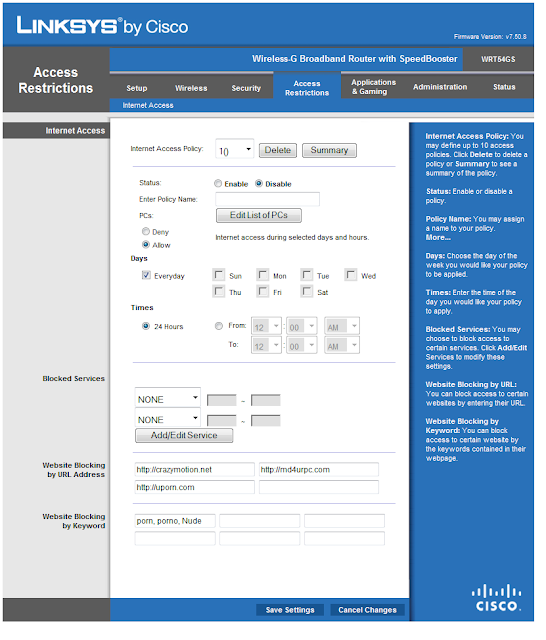
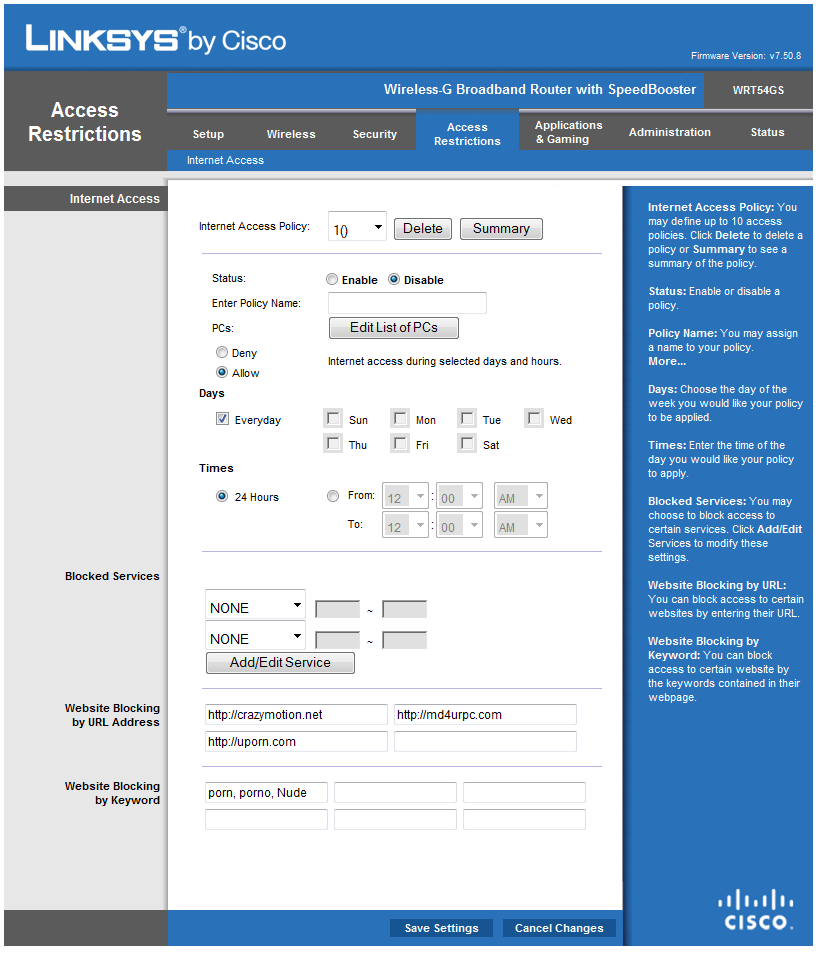
In the above pic as you can see using the Linksys (Cisco) Wireless router You can also set it to block certain websites or Keywords on a website.
Saturday, May 1, 2010
Activate the administrator account
This Video will show you how to get to the User Account and also how to Active your Administrator account within windows.
I mean how many times have you tryed to make an account withe name ADMINISTRATOR ?
In this short Video I will show you how to do it.
Net user administrator active:/yes
You can Also see the Video and others at on my youtube Channel
By clicking HERE
Or at the Bottom left of this Blog you can Click on the youtube ICON and my videos pop up, Select the one you want to see.
Also make them Full screen Much Better Viewing.
Subscribe to:
Posts (Atom)


